Uses
Here's the gear, apps, and tools I use most often — updated semi-regularly whenever I remember. For more setups, check out uses.tech
🤖 AI Tools
- ChatGPT: My general-purpose assistant
- Claude Code: For anything dev-related
- MidJourney: Still the best imo for art generation
- Photoshop: Still unmatched for surgical photo editing. Their AI features are really underrated.
- Granola: As someone who is pretty forgetful, client-side meeting transcription is a game changer.
- Wispr Flow: Better voice dictation than apple’s native (I’m an investor in this!)
🧠 Notes & Productivity
- Google Keep: Honestly the winner just because it’s frictionless
- Obsidian: I try for long-form stuff, but tbh Keep usually wins
- Motion: Currently experimenting with this for calendar + task planning
- Apple Reminders: Occasionally for time/location-based pings
- Linear: For project/task tracking at work
- Vibe coding a custom personalized productivity tool to better fit how I work (WIP)
🧑💻 Software & Apps
- Arc browser: Even if it’s been effectively abandoned, I can’t bring myself to switch because I just love the sidebar too much.
- Readwise Reader: Where my reading pile lives
- Snipd: A podcast app with cool AI features
- Superhuman: I literally switched from Android to iPhone a few years ago because Superhuman only had an iOS app. Getting someone to switch OSes to use your app, now that’s product market fit.
- Rabby Wallet: Best EVM desktop wallet by far.
- Figma: For collab design work
- Photoshop: My OG go-to for photo editing
- Cursor: My current IDE. Tbh, I don’t use the AI features anymore, cause I only use Claude Code now. I basically just use it when I need to manually read or edit something. It’s basically just reverted to being VS Code for me now 😂
- Mac Utilities I install every time
- Paste: A great clipboard manager that lets you search and paste everything you’ve copied.
- Rectangle: A free window management app that lets you quickly snap and resize windows with keyboard shortcuts.
- CleanShot: A great screenshot and screen recording tool
- Yoink: A drag-and-drop shelf that temporarily stores files and snippets for easier movement between apps.
- ColorSlurp: A super easy to use color picker and palette manager
🧰 Hardware
I don’t know how this happened but I somehow turned into an Apple maxi?? As mentioned, I switched to iOS because of Superhuman but then quickly fell down the ecosytem gravity well.
Main Machine
- MacBook Pro 16” (M2): My daily driver. Does everything I need, fast and quiet.
Everyday carry
- iPhone: My primary mobile device.
- Magsafe Popsocket Base: I love popsockets. But this base lets me use any popsocket while easily taking it off when I want to use it with a wireless charger or something. I have a stash of extras in my backpack, cause I inevitably keep losing them every few months.
- AirPods Pro: I use these whenever I’m out and about.
- AirPods Max: I keep these in my backpack, and use them when I plant down to work remotely.
- Apple Watch: It’s fine. I wear it most days, but tbh, I’m not sure I’m really using them that effectively.
- Peak Design Backpack: I love this backpack, especially its unique flap that lets it really expand when you need to shove A LOT in.
Other
- Kobo e-reader: I use this for reading e-books and Pocket (RIP).
- iPad: I rarely use this, mostly just for watching videos on flights.
- Apple Vision Pro: These are technically so awesome. Whenever I put them on, I’m amazed. But I can’t find anything worth doing in them!? So in practice, they’re mostly just collecting dust.
- iPad Mini: This one is a dedicated used for my private flying. Used as a kneeboard running Foreflight primarily.
🖥️ Desk Setup
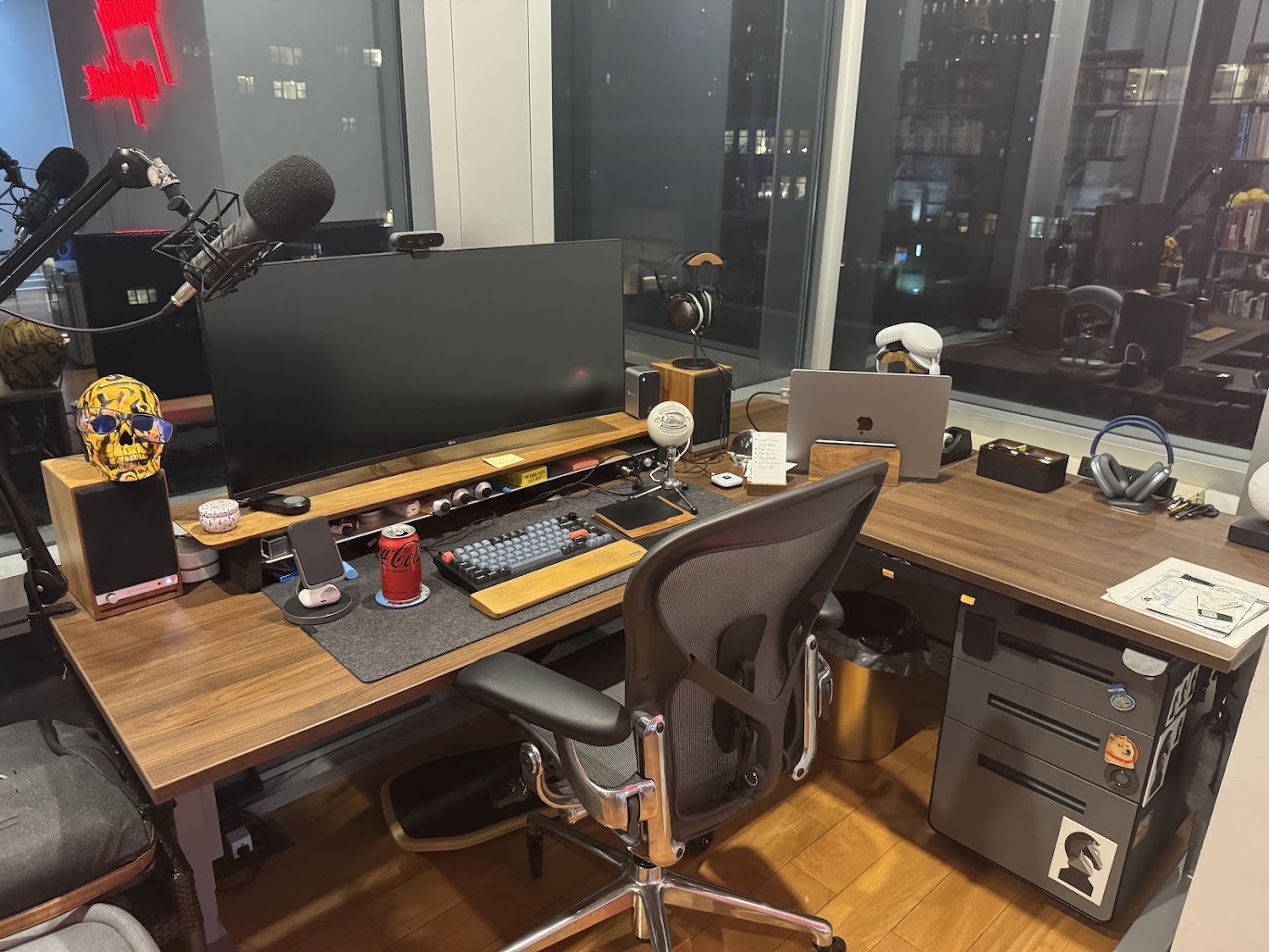
Some highlights:
- Docking Station: I don’t have a desktop, I plug in my macbook, which is nice because I don’t have to sync stuff between different machines.
- Anker Wireless Charging Stand: I love this thing. Because it acts like a phone stand, wireless charger for both phone and airpods, but best of all, the charging thing comes off the stand and becomes a portable wireless charger as well!
- Rode Procaster: I have two mics on my desk. This one is on boom mic and used for podcasting.
- Blue Snowball: I use this for everyday stuff, calls, etc.
- Logitech webcam: Gets the job done
- Edifier Speakers: The speakers I use for calls and music when I don’t want to wear headphones.
- Monolith Wired Headphones: I’m not an audiophile at all, but it sounds way better than wireless headphones. When I’m locked in and listening to music, its what I prefer.
- Airpods Max: An older pair of Airpods Max (with a lightning port) that I keep at the desk. Used for when I want to wear headphones for calls, but don’t want to be forced to stay in place, I can get up and walk around.
- Scarlett Solo: The amp that is used for the podcasting mic, wired headphones, and speakers.
- LG Ultrawide Monitor: Make sure you use Rectangle for easy tiling management!,
🚗 Vehicles
- Jeep Gladiator: My everyday truck I use.
- Kawasaki Ninja 400: For when I wanna be on two wheels.